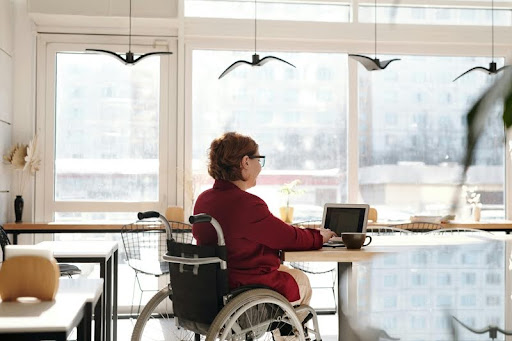
Accessibility in action—creating workspaces where everyone can thrive
Creating office environments that adhere to U.S. accessibility standards is about more than just fulfilling legal requirements. It involves crafting a workspace where all individuals feel valued, comfortable, and capable of performing at their highest potential, regardless of their physical capabilities or sensory sensitivities. Whether starting anew or renovating an existing office, applying inclusive design principles can significantly enhance the workday experience for employees.
So, what does it truly entail to develop an office that accommodates everyone’s needs? Let’s explore.
What Are the U.S. Accessibility Standards for Office Locations?
The primary source of U.S. accessibility standards for office environments is the Americans with Disabilities Act (ADA). This federal regulation mandates that public spaces, which include most workplaces, must be accessible to individuals with disabilities. This encompasses features such as doorways that are wide enough for wheelchairs, alternative routes like ramps instead of stairs, and accessible restroom facilities, among other considerations.
The ADA applies to employers with 15 or more team members, although many smaller businesses voluntarily adhere to its guidelines because it’s the ethical choice.
Key requirements include:
Entrances and corridors must accommodate mobility devices.
Restrooms should have grab bars, appropriate sink heights, and sufficient space.
Workstations need to be accessible without any hindrances.
Signage must be clear and legible, incorporating braille when necessary.
Consider ADA compliance as your starting point. It establishes essential accessibility; however, genuine inclusion surpasses these basic standards.
Why Is Inclusive Design Essential in the Workplace?
Inclusive design extends beyond mere accessibility. It focuses on fostering a work environment that is effective for all individuals.
This encompasses employees with mobility difficulties, vision or hearing impairments, neurodivergent individuals, and even those recovering from temporary injuries. Inclusive environments foster a sense of belonging. When individuals feel included, they tend to be more engaged, productive, and committed to their employers.
Additionally, it’s important to note that inclusive design can have far-reaching impacts. It can decrease turnover rates, elevate employee morale, and help attract talent from a wider demographic.
How to Organize an Inclusive Office Layout
Begin by considering the flow of the space. Is it straightforward for someone using a wheelchair or walker to move from the entrance to their workspace without encountering obstacles? Can individuals navigate the area without colliding with furniture or having to maneuver through narrow passages?
Ensure that:
Aisles are unobstructed and sufficiently wide (36 inches is a recommended guideline).
Desks are arranged to provide ample space for turning or walking through.Emergency exits are accessible to everyone
Think about how people move through the space. Avoid cluttered walkways or tight corners that could make someone feel excluded just because the layout wasn’t designed with them in mind.
What Office Features Support Accessibility and Inclusion?
A lot, actually. Let’s talk about some specific features that can make a space more inclusive:
- Adjustable desks and chairs: These help accommodate people of different heights and needs. Sitting or standing should be a choice.
- Clear signage: Signs with high-contrast colors and braille can help those with visual impairments.
- Acoustic panels and soundproofing: These can reduce distractions for neurodivergent employees or those with sensory sensitivities.
- Good lighting: Natural light is ideal, but even artificial lighting should avoid harsh glare or flickering.
- Accessible tech: Keyboards with larger print, screen readers, voice-controlled devices, and captioning tools can all help.
Every detail counts. The more options people have, the more empowered they feel to choose what works best for them.
How to Make Conference Rooms and Common Areas Inclusive
These shared spaces are where inclusion can either shine, or fall apart.
Conference rooms should have tables and chairs that are easy to move or adjust. There should be room for wheelchairs, and cords or equipment should never block access.
Don’t forget tech: Screens should be positioned at a height that’s easy to view for everyone. Remote meeting tools should support live captions or screen sharing with accessibility features.
In break rooms and restrooms, think about:
- Counter heights
- Microwave and fridge accessibility
- Touch-free appliances
When you design these areas thoughtfully, everyone feels like they belong, and that matters more than you might think.
What Role Does Technology Play in Inclusive Office Design?
A huge one. Technology helps bridge the gap between physical and digital accessibility.
Some people might use voice commands to control lighting, others might rely on screen readers to interact with content. Your office should support all of that.
Here are a few tools to think about:
- Speech-to-text programs
- Screen magnification software
- Smart whiteboards with captioning
- Virtual meeting platforms with accessibility settings
Plus, your Wi-Fi should be strong and reliable throughout the building. Accessibility tech won’t help much if the connection keeps dropping.
How Can Employers Involve Employees in the Design Process?
Emergency exits are accessible to everyone
Think about how people move through the space. Avoid cluttered walkways or tight corners that could make someone feel excluded just because the layout wasn’t designed with them in mind.
What Office Features Support Accessibility and Inclusion?
A lot, actually. Let’s talk about some specific features that can make a space more inclusive:
- Adjustable desks and chairs: These help accommodate people of different heights and needs. Sitting or standing should be a choice.
- Clear signage: Signs with high-contrast colors and braille can help those with visual impairments.
- Acoustic panels and soundproofing: These can reduce distractions for neurodivergent employees or those with sensory sensitivities.
- Good lighting: Natural light is ideal, but even artificial lighting should avoid harsh glare or flickering.
- Accessible tech: Keyboards with larger print, screen readers, voice-controlled devices, and captioning tools can all help.
Every detail counts. The more options people have, the more empowered they feel to choose what works best for them.
How to Make Conference Rooms and Common Areas Inclusive
These shared spaces are where inclusion can either shine, or fall apart.
Conference rooms should have tables and chairs that are easy to move or adjust. There should be room for wheelchairs, and cords or equipment should never block access.
Don’t forget tech: Screens should be positioned at a height that’s easy to view for everyone. Remote meeting tools should support live captions or screen sharing with accessibility features.
In break rooms and restrooms, think about:
- Counter heights
- Microwave and fridge accessibility
- Touch-free appliances
When you design these areas thoughtfully, everyone feels like they belong, and that matters more than you might think.
What Role Does Technology Play in Inclusive Office Design?
A huge one. Technology helps bridge the gap between physical and digital accessibility.
Some people might use voice commands to control lighting, others might rely on screen readers to interact with content. Your office should support all of that.
Here are a few tools to think about:
- Speech-to-text programs
- Screen magnification software
- Smart whiteboards with captioning
- Virtual meeting platforms with accessibility settings
Plus, your Wi-Fi should be strong and reliable throughout the building. Accessibility tech won’t help much if the connection keeps dropping.
How Can Employers Involve Employees in the Design Process?
Want to know the best way to make sure your office meets people’s needs? Ask them.
No one understands what people need better than the people themselves. Survey your team. Host a feedback session. Or create an inclusion task force to get input early in the process.
And don’t assume one size fits all. What works for one person might not work for another. Inclusive design means offering choices.
Maintaining Accessibility Over Time
Designing an accessible office isn’t a one-and-done job. Things change. Employees come and go. New technology becomes available.
Here’s how to stay on top of it:
- Do annual accessibility audits
- Train your staff on disability awareness and inclusive behavior
- Update furniture and tech as needed
- Stay informed on updates to ADA guidelines and local building codes
When inclusion is part of your company culture, it becomes second nature.
Final Thoughts
Designing an inclusive office space is about more than ramps and handrails. It’s about building a workplace that works for everyone.
Start with accessibility, but don’t stop there. Listen to your team, think ahead, and keep evolving your space as needs change. Because when people feel included, they do their best work, and that benefits everyone.
Want to improve your office design? Start by walking through your space with fresh eyes. What would someone with different needs notice right away?
FAQ: Inclusive Office Design and Accessibility Standards
What is required for ADA compliance in an office? Businesses must ensure access to entrances, restrooms, workspaces, and common areas. This includes wide doorways, ramps, and accessible signage.
How do I know if my office is accessible? Conduct an accessibility audit or consult an ADA specialist to review your current layout and features.
What are examples of inclusive office features? Adjustable furniture, clear signage, accessible restrooms, and assistive tech like screen readers or voice controls.
Can small businesses afford inclusive design? Yes. Many changes are low-cost, and federal tax credits may help offset the expense of accessibility improvements.
About the Author