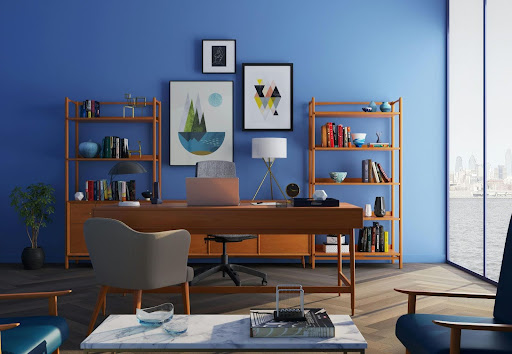
A cozy and efficient home office setup designed for focus and comfort
So you’re working from home, or maybe planning to. Whether it’s full-time remote, hybrid, or just a side hustle gig, one thing’s for sure: you need a home office space that works for you, not against you.
But here’s the thing. A “home office” isn’t just tossing a laptop on the kitchen counter or squeezing into the corner of your bedroom. To truly stay productive, comfortable, and focused, you need a space that’s thoughtfully designed to meet your needs.
In this guide, we’ll walk through everything you need to know about creating a functional home office, from choosing the right location to picking the best desk setup and lighting. Let’s get into it.
What’s the best place in your home for a productive office?
Pick a quiet, well-lit area with some level of separation from distractions.
This is step one, and it matters more than you might think. The ideal home office location should feel like a zone, somewhere your brain can associate with “work mode.” You want to avoid high-traffic areas like right next to the kitchen, laundry room, or TV lounge. Those spots invite noise, interruptions, and the ever-tempting snack break.
Look for a space with good natural light if possible. Research shows that exposure to daylight can boost mood and focus, not to mention save on energy bills.
Don’t have a spare room? No problem. You can carve out a functional workspace in a corner of your bedroom, a large hallway, or even a closet (hello, cloffice trend!). The key is to dedicate it, make it clear that this is where work happens.
How do you figure out what you need in your home office?
Start by asking: What kind of work do I do, and what tools do I use every day?
A graphic designer needs something different than a freelance writer or a virtual assistant. If you’re doing video calls, you’ll need a quiet backdrop and decent lighting. If you’re managing physical files or shipping products, you’ll need storage and table space.
Take inventory of:
- Equipment (laptop, monitor, printer?)
- Tasks (writing, meetings, hands-on work?)
- Time (full workdays or just a few hours?)
This helps you decide everything from desk size to how many outlets you’ll need. Designing a home office without this step is like baking without a recipe; you might get lucky, but probably not.
What ergonomic furniture should every home office have?
The basics: a comfortable chair, a well-sized desk, and furniture that supports your posture.
Ergonomics isn’t just a fancy buzzword. It’s the difference between finishing the day with energy vs. needing an ice pack for your lower back.
Here’s what to focus on:
- Chair: You need one with lumbar support. Adjustable height and armrests are a plus.
- Desk: It should allow you to sit with your elbows at 90 degrees. Bonus if it fits your monitors and gear without feeling cramped.
- Add-ons: Consider a footrest, a monitor riser, or a standing desk converter. Small tweaks = big improvements.
A good setup supports your body so you can focus on your work, not your sore neck.
What’s the best layout for a productive home office?
Keep your most-used tools within arm’s reach and group related tasks into zones.
You don’t need a massive office to be efficient. It’s all about how you arrange what you have. Place your monitor at eye level to reduce strain. Put your phone, notepad, and other essentials on the dominant side of your desk. If you use a printer or files often, don’t hide them three feet away in a cabinet.
Think of your space in zones:
- Focus zone (desk, laptop, main work)
- Storage zone (drawers, shelves)
- Creative or planning zone (whiteboard, notebooks, etc.)
Even a small space feels bigger when it’s well-organized.
What kind of lighting should a home office have?
Use a mix of natural light, task lighting, and ambient light for comfort and visibility.
If your office feels like a cave, or a blinding interrogation room, it’s going to kill your focus. The trick? Layer your lighting.
- Natural light: Ideal, especially if you can sit near a window.
- Task lighting: Think desk lamps with adjustable brightness.
- Ambient lighting: Soft overhead lights or wall sconces to reduce eye strain.
Avoid placing your screen directly in front of or behind a window to prevent glare. And if you’re on Zoom a lot, experiment with ring lights or desk lamps angled toward your face for even lighting.
How do you personalize your home office without creating distractions?
Add a few items that make you feel good, but don’t overdo it.
Yes, your space should feel like you, but the vibe should say “focused and ready” more than “Pinterest explosion.” Stick with décor that inspires calm and concentration.
Try:
- One or two plants (real or fake, no judgment)
- A framed quote or favorite photo
- Accent colors that boost focus (like soft blues or greens)
Color psychology is real. Blue can enhance focus, while yellow sparks creativity. Red? Maybe save that for your workout zone.
What’s the best way to organize supplies and storage in a home office?
Use a mix of open and closed storage to keep things tidy and accessible.
Clutter kills focus. Seriously. A Princeton study found that visual clutter limits your brain’s ability to process information. Translation? Messy desk = messy mind.
- Use drawers or baskets for stuff you don’t use daily.
- Use desktop organizers for pens, notepads, and cables.
- Install floating shelves to keep the floor space clear.
And label things! You’ll thank yourself later when you’re not digging through a random drawer for a stapler.
How do you set up tech and connectivity for a home office?
Make sure you’ve got strong Wi-Fi, enough outlets, and a charging system.
Nothing derails your workday like a dropped Zoom call or dead laptop. Make sure your space is plugged in, literally.
- Use a surge protector to guard against power outages.
- Add a USB hub or docking station if you have lots of devices.
- Mount a few adhesive cable clips to keep cords from turning into spaghetti.
Got a weak Wi-Fi signal in your chosen spot? Consider a mesh router system or a plug-in extender. Connectivity is king in a home office.
How do you keep your home office space productive long term?
Set boundaries, manage noise, and keep the space clean.
Let’s face it, home is full of distractions. That’s why it helps to build routines and boundaries. If you live with others, set clear “do not disturb” times. Use noise-canceling headphones, white noise machines, or even soft background music to create focus.
And don’t underestimate the power of a 5-minute daily tidy-up. Wiping down surfaces and straightening your desk makes Monday mornings feel less chaotic.
Why is it important to design a dedicated home office?
Having a space that supports your workflow boosts both your productivity and well-being.
You’re not just designing a room. You’re designing how you work, think, and even feel during the day. A well-set-up home office helps reduce physical strain, fight burnout, and keep distractions at bay.
The best part? It doesn’t have to cost a fortune or take up a ton of space. A little intention goes a long way.
FAQ: Quick Answers to Common Home Office Questions
What’s the best chair for a home office?
Look for one with lumbar support, adjustable height, and breathable material. Comfort and posture matter most.
How can I make a home office in a small space?
Use corners, closets, or fold-down desks. Focus on vertical storage and multi-functional furniture.
What color is best for a home office?
Soft blues and greens promote calm and focus. Avoid overly bright or harsh colors that can feel distracting.
How do I improve lighting in a dark room?
Add layered lighting: desk lamps, floor lamps, and soft ambient lights. Use daylight bulbs for a natural feel.
Can I use my bedroom as a home office?
Yes, but set physical and mental boundaries. Use room dividers or designate one side of the room just for work.
Ready to Create a Home Office That Works for You?
A functional home office isn’t just about furniture, it’s about intention. Whether you’re setting up in a spare room or repurposing a corner, you can create a space that supports your goals, habits, and health.
So go ahead, take a look around your home. What space could become your productivity powerhouse?
And if you’ve already started setting up your home office, what’s working for you so far
About the Author